
WebP and AVIF both do the same job: show the same picture as a JPEG or PNG in a smaller file. They are not rivals you must choose between. On most WordPress sites the best answer is to use both, with your original image as the fallback. This guide explains why, and where each format is stronger.
The short answer
- Use WebP as your baseline. Every current major browser displays it and it is quick to create.
- Add AVIF on top where you can. It is usually smaller again, and browsers that support it will take it in preference.
- Keep the JPEG or PNG. It is the fallback for anything that understands neither.
WebP and AVIF compared
| WebP | AVIF | |
|---|---|---|
| Introduced | 2010, by Google | 2019, by the Alliance for Open Media |
| Based on | The VP8 video codec | The AV1 video codec |
| Browser support | All current major browsers, including Safari since version 14 | Chrome since 85, Firefox since 93, Safari since 16, Edge since 121 |
| Typical file size | Smaller than JPEG or PNG | Usually smaller than WebP, most of all for photos |
| Time to create | Fast | Noticeably slower |
| Transparency and animation | Yes | Yes |
| Wide colour and HDR | Limited | Yes |
| WordPress can upload it | Since WordPress 5.8 | Since WordPress 6.5 |
A note on the WordPress row: being able to upload a format is not the same as WordPress converting your existing images to it. By default WordPress keeps the format you upload. Converting a library to WebP or AVIF takes a plugin or a service.
Where WebP is the better choice
Compatibility. WebP has been supported in every major browser for years. If you could only serve one modern format, this is the one.
Speed of conversion. Creating a WebP file takes little processing, which matters when a library has thousands of images or the work happens on a small hosting plan.
Graphics with flat colour. For logos, icons and screenshots, lossless WebP is usually smaller than PNG, and the gap between WebP and AVIF is often small.
Where AVIF is the better choice
Photographs. AVIF's strength is photographic detail. At the same visible quality it usually produces a smaller file than WebP, and it holds up better at low sizes, where WebP tends to smear fine texture.
Smooth gradients. Skies and soft backgrounds are where older formats show banding. AVIF handles them well.
Wide colour and HDR. If you publish images in wide-gamut colour, AVIF can carry it. WebP is limited here.
The cost is time. AVIF takes much longer to encode than WebP, so converting a large library is slower, and on a shared server it can be heavy work.
How a browser ends up with the right file
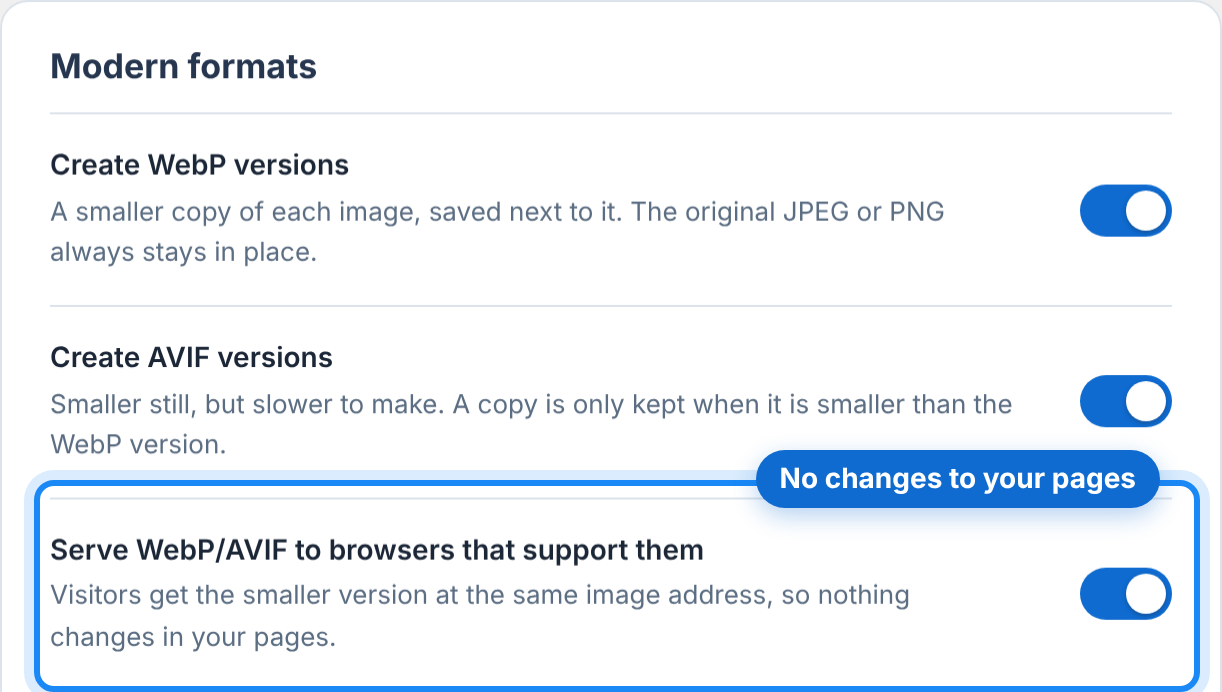
You do not have to choose per visitor. Each browser tells the server which image formats it accepts. A site set up for modern formats answers with AVIF if the browser accepts AVIF, otherwise WebP if it accepts that, otherwise the original.
There are two common ways to do this in WordPress:
- Same address, different file. The server looks at what the browser accepts and returns the best version at the image's usual address. Nothing in your pages changes. This is how LeanPixel does it.
- A
pictureelement. The page lists each version and the browser picks. This changes your HTML and can clash with some themes and page builders.
If you use a CDN with the first method, set it to keep separate cached copies for browsers with and without WebP and AVIF support. Otherwise a browser that cannot read AVIF may be handed one.
A sensible setup for a WordPress site
- Compress your JPEG and PNG originals. They remain the fallback, so they should be lean too.
- Create WebP versions of everything.
- Create AVIF versions as well if your plan and server allow, and keep an AVIF only when it is smaller than the WebP.
- Serve by what the browser accepts.
- Keep the originals somewhere safe until you are satisfied.
In LeanPixel, WebP versions are part of every plan, including the free one. AVIF versions are included on the Plus and Agency plans, and an AVIF is only kept when it beats the WebP version. See LeanPixel pricing for the details.
Common questions
Will switching to WebP or AVIF hurt my search ranking?
No. Search engines read both formats. Smaller images help pages load faster, which is the part that matters.
Do I need to re-upload my images?
No. A conversion tool creates the new versions from the images already in your media library.
Should I delete my JPEG and PNG files once I have WebP and AVIF?
No. They are the fallback for older browsers, for some email clients and social networks when your images are shared, and for you if you ever change tools.
Is AVIF always smaller than WebP?
Usually, not always. For simple graphics the WebP can be as small or smaller, which is why it is worth keeping an AVIF only when it wins.
Next steps
To see what each format would save on your own pages, run the free image optimization test: it reports the WebP result and the AVIF result side by side. For the full order of work, read how to optimize WordPress images without losing quality.